Welcome to an unplanned post in the Building an Event Management System with Claude Code series. If you’ve been following along, you know we designed our database schema in Part 5, set up our infrastructure in Part 4, and we’re ready to build import tools in Part 6.
- To see all posts in the series, go to: Building an Event Management System with Claude Code.
But there’s a problem. A problem I didn’t realize until I started working on Part 6.
The Problem: Designing from Mental Models vs Real Data
In Part 5, when we designed our database schema, I approached it the traditional way: I told Claude Code what I thought we needed based on my mental model of the system.
What I said (sort of) to Claude Code in Part 5:
We need tables for:
- contacts (people who attend or speak)
- events (our conferences)
- tickets (registration records)
- speaker_sessions (who spoke about what)
- speaker_ratings (feedback)
Code Snippet 1: Initial Schema Design Based on Mental Models
Claude Code designed a clean, normalized schema. It looked great. We created the tables, generated test data, and everything worked perfectly with natural language queries.
Then I started working on Part 6.
Part 6 is about building a custom MCP server to import real data from:
- Quicket (ticketing platform, registration and check-in) - CSV exports
- Sessionize (speaker management) - CSV exports
- Microsoft Forms (walk-in check-ins, speaker feedback) - CSV exports
As I wrote the section on the actual CSV file formats, I kept noticing that many columns in the CSV files were not in the schema, and those columns could be important.
For example, the Quicket export had columns like:
Ticket TypeProfessionArea of InterestLink Campaign
These fields could be very useful for segmentation and analysis, but they were not in our original schema. The same story with some of the other CSV files.
I realised: I made a fundamental mistake in Part 5.
The Right Approach: Let Real Data Drive Schema Design
Here’s what I should have done in Part 5:
Instead of:
Me: "We need tables for contacts, events, tickets, sessions, and ratings"
Claude Code: "Here's a schema based on your description"
Code Snippet 2:: What I Did
I should have done:
Me: "Here are the actual CSV files we'll be importing from. Design a schema that efficiently handles this real-world data."
[uploads quicket-registration.csv, sessionize-export.csv, feedback-form.csv, etc.]

Claude Code: "Based on these files, here's what you need..."
Code Snippet 3: What I Should Have Done
Why does this matter?
Real data reveals requirements that mental models miss:
- Field names and types
- Relationships between entities
- Data quality issues (NULLs, formats)
- Hidden complexity (order numbers, purchaser vs attendee)
- Actual cardinality (one-to-many relationships)
This is a core principle of AI-native development: show the AI your real-world constraints first, then let it propose solutions. You get better designs faster because the AI sees patterns and edge cases you might overlook.
So let’s do it right now. Let’s iterate.
Starting the Conversation with Claude Code
I re-engaged with Claude Code, and I needed Claude Code to analyse the actual CSV files and recommend schema changes.
Upload Real Data and Ask for Analysis
I started with setting the scene:
I think that when we created the database schema and tables a couple of days ago, I approached it the wrong way. Instead of describing what was needed, I should have uploaded the individual CSV/Excel files to you. You would think about which columns, etc., from the files would be required, taking into account what we need for contacts, as well as for analysis.
Code Snippet 4: Prompt to Claude Code for Schema Reevaluation
Remember, this was after I had started with the import tools in Part 6, so I wanted to make sure that Claude Code understood the context.
Claude Code’s response:
You're absolutely right - that's excellent data-driven thinking! Looking at the actual CSV/Excel files would have given us:

  1. Exact column names - not our guessed "ticket_number", "first_name", etc.
  2. Real data formats - date formats, phone number patterns, how names are structured
  3. Hidden valuable fields - columns we didn't think about that could be useful for analysis
  4. Data quality issues - empty fields, inconsistencies, how duplicates actually appear
  5. Structural quirks - multiple sheets in Excel, header rows, footer notes, etc.

  This would have ensured our schema perfectly matches reality instead of our assumptions.

  Good news: We can still do this! We have a few options:

  Option 1: Review files now, adjust schema if needed

[snipped for brevity]

  Option 2: Review files, adjust import mappings only

[snipped for brevity]

  Option 3: Hybrid approach

[snipped for brevity]

  Would you like to upload the actual files now? I can analyze:
  - Quicket registration export (CSV)
  - Quicket check-in export (CSV)
  - Microsoft Forms walk-in export (CSV)
  - Sessionize export (CSV/Excel)
  - Speaker rating forms (CSV/Excel)

  This will give us a reality check before we build the import MCP server.
Code Snippet 5: Claude Code's Response on Next Steps
As you see in Code Snippet 5, the response is positive. BTW, LLMs in general condenscending reply: “You’re absolutely right …” starts to p*ss me off! Anyway, Claude Code acknowledges the oversight and agrees that real data should drive schema design:
I prefer Option 1, but let's start with uploading files. I will upload them one by one, and I want you to THINK HARD about what columns from the various files would be useful, both to store as well as for analytical purposes. Just return the columns you think and why, and then afterwrads we will decide what to do and not to do.
Code Snippet 6: User's Decision to Proceed with Option 1
In Code Snippet 6, you see how I ask Claude Code to Think about each file’s columns and their value. I may have mentioned this before, but the think “keyword” is a way to indicate to Claude Code about how much computational thinking time to allocate to your request. You have the following options:
think- Claude Code allocates a baseline amount of computational resources to consider your request.think hard- signals Claude Code to dedicate more processing time to your request.think harder- allocates substantial computational resources for complex problems that require deep analysis.ultrathink- the highest level of computational dedication for the most challenging tasks. It is hard-coded to set the thinking token budget to exactly 31,999 tokens; the maximum allocation available.
Claude Code went off and thought hard about the request, and came back with:
● Perfect! I'm ready to analyze each file carefully. Let me set up a todo list to track this analysis process, then you can upload the first file.

● Excellent approach! I'm ready to analyze the files one by one.

  For each file, I'll:
  1. Read the entire structure - all columns, data types, sample values
  2. Think deeply about each column's value for:
    - Core contact/event management needs
    - Analytical queries (trends, patterns, insights)
    - Deduplication and data quality
    - Future reporting needs
  3. Recommend which columns to keep with detailed reasoning
  4. Flag any surprising/valuable data we might have missed in our schema design

  Go ahead and upload the first file - which one would you like to start with?
Code Snippet 7: Claude Code's Readiness to Analyze Uploaded Files
I uploaded file by file, and for each file, Claude Code returned a detailed analysis of which columns to keep and why. An example from the Quicket registration CSV:
 3. Marketing Attribution Gold 🚨 SCHEMA GAP

  - Column 27: Link Campaign - values seen:
    - "Priority" (early bird?)
    - "Web" (website registration)
    - "LinkedIn" (LinkedIn campaign)
    - "Email" (email campaign)
    - Empty (direct/unknown)

  Why this matters:
  - Answer "Which marketing channel drives most registrations?"
  - Track campaign ROI
  - Optimize future marketing spend

  Current schema issue: We don't capture marketing source.
Code Snippet 8: Excerpt from Claude Code's Analysis of the Quicket Registration CSV
What we see in Code Snippet 8 is a column I had not considered important when designing the schema, but Claude Code highlights its analytical value! In the analysis, Claude Coe also suggests how to adjust the schema to capture this data.
Eventually, Claude Code was done:
Ready to synthesize all findings and make final recommendations!
Code Snippet 9: Claude Code's Completion of File Analysis
My response to Claude Code:
Please synthesize all findings and make final recommendations. Please also output the recommendations to an .md file so i can review it properly. Do NOT do any schema changes yet. We will go through schema changes after I have reviewed the doc.
Code Snippet 10: User's Request for Synthesis and Documentation
Claude Code synthesised everything into a detailed markdown document outlining the recommendations and schema changes:
● Write(docs\planning\import-analysis-and-recommendations.md)
  ⎿
[snipped for brevity]

● Perfect! I've completed the comprehensive analysis and created a detailed recommendations document.

  Summary

  Document created: docs/planning/import-analysis-and-recommendations.md (32,000+ words)

[snipped for brevity]

  Next Steps:

  1. Review the document - Check if recommendations align with your vision
  2. Answer open questions (Section near end of doc)
  3. Prioritize phases - Decide which to implement first
  4. I'll await your feedback before making any schema changes

  The document is ready for your review at docs/planning/import-analysis-and-recommendations.md!
Code Snippet 11: Claude Code Creating the Review Document
This was exactly what I needed. Claude Code identified every missing field, explained why it matters, proposed the exact SQL to fix it, and even considered indexing strategies.
The created document is published as a gist for your reference:
Import Data Analysis & Schema Recommendations. Please have a read-through to see the depth of analysis Claude Code provided.
I reviewed the document, identified some points I disagreed with, and asked Claude Code to change them. Claude Code made the changes, and we finalised the schema adjustments.
So, we now need to migrate to the new schema.
Creating the Migration
With the new schema design finalised, I asked Claude Code to generate a migration script to alter the existing database structure:
This is perfect, and I am happy with the schema. Can you now create a migration SQL file:

1. Create: database/migrations/002_schema_refinement.sql
2. Include:
   - Header comment explaining what this migration does
   - All ALTER TABLE statements
   - All CREATE INDEX statements
   - ROLLBACK statements (how to undo these changes if needed)
3. Make it production-ready (idempotent, safe to run multiple times)

Also update database/schema/01_initial_schema.sql to reflect the new
complete schema (for reference when someone clones the repo fresh).
Code Snippet 12: User's Request for Migration Script
Claude Code’s response to the prompt in Code Snippet 12 was:
● I'll create the migration file and update the initial schema. Let me start by reading the current schema to understand the existing structure.

[Claude Code is doing "stuff" - snipped for brevity]

● Perfect! I've created both files and committed them to your repository. Here's what was created:

  1. Migration File: database/migrations/002_schema_refinement.sql

  Features:
  - ✅ Idempotent - Safe to run multiple times (uses IF NOT EXISTS checks)
  - ✅ Production-ready - Includes comprehensive error handling
  - ✅ Documented - Detailed header explaining all changes
  - ✅ Reversible - Complete rollback instructions at the bottom

[snipped for brevity]

  ---
  2. Complete Schema: database/schema/01_initial_schema.sql

  Purpose: Reference schema for fresh database setup (reflects post-migration state)

[snipped for brevity]

  ---
  Next Steps

  To apply the migration to your Neon database:

  # Option 1: Via Postgres MCP Pro (using Claude)
  # Just tell Claude: "Run the migration file 002_schema_refinement.sql"

  # Option 2: Via psql command line
  psql $NEON_DATABASE_URL -f database/migrations/002_schema_refinement.sql

  The migration will:
  - ✅ Add all new tables and columns
  - ✅ Create all indexes
  - ✅ Update constraints
  - ✅ Be safe to run multiple times (idempotent)

  Commit: 60f6ed4 - "Add schema refinement migration and updated complete schema"

  Everything is now ready for the next phase: building the import MCP server! 🎉
Code Snippet 13: Claude Code's Completion of Migration Script Creation
With that, we have successfully refined our schema based on real data insights and created a migration to update our database accordingly. You can view the migration script here: Schema Refinement for Import Data Support.
Running the Migration
Now that we have the migration script, the next step is to run it against our Neon database to apply the schema changes. As you see in Code Snippet 13, Claude Code provided two options for running the migration:
- Option 1: Via Postgres MCP Pro (using Claude Code) - You can instruct Claude Code to run the migration file directly within the MCP Pro interface.
- Option 2: Via psql command line - You can use the
psqlcommand line tool to execute the migration script against your database.
Those were the two options provided by Claude Code, but there are actually more ways to run the migration. In previous parts of this series, we used VSCoded to connect to the Neon database, and we can open the migration script in VSCode and run it there.
However, as this is all about AI-assisted coding, I opted to use Option 1 and let Claude Code handle the migration execution:
Apply the migration to Neon database, using the PostgreSQL MCP Pro MCP server. After the migration verify it succeeded by:

- Checking that all new columns exist
- Verifying indexes were created
- Running a sample query that uses the new fields

Show me the results.
Code Snippet 14: User's Request to Apply Migration via MCP Pro
Claude Code executed the migration:
● I'll apply the migration to your Neon database using Postgres MCP Pro and then verify everything was created successfully.

[snipped for brevity]

● Now I'll execute the migration using Postgres MCP Pro:

[Claude Code creates tables - snipped for brevity]

● Now adding columns to contacts table:

[ Claude Code adds columns to contacts and other tables snipped for brevity]

● Perfect! Migration completed. Now let me verify the results:

[Claude Code verifies - snipped for brevity]

● Excellent! The migration has been successfully applied to your Neon database. Here's a complete verification report:

  ---
  ✅ Migration 002: Schema Refinement - COMPLETED

[snipped for brevity]

  ---
  🎯 Migration Complete - Ready for Import Tools

  Your database schema is now fully prepared to support:
  - ✅ Quicket registration imports (with marketing attribution)
  - ✅ Quicket check-in imports
  - ✅ Microsoft Forms walk-in imports
  - ✅ Sessionize speaker/session imports
  - ✅ Speaker evaluation/rating imports (1-7 scale)
  - ✅ Interest topic tracking (normalized structure)
  - ✅ Speaker enrichment data (separate table)

  Next Steps:
  - Build the custom Import MCP server (FastMCP)
  - Test imports with real CSV/Excel files
  - Populate the new fields with actual event data

  The migration was idempotent and can be safely run again without errors. All changes have been successfully applied to your Neon PostgreSQL 17.7 database! 🎉
Code Snippet 15: Claude Code's Completion of Migration Execution and Verification
As we see in Code Snippet 15, Claude Code successfully executed the migration, verified that all new columns and indexes were created, and confirmed that the database is now ready for the import tools we will build in Part 6.
Verification: Natural Language Queries
As in some of the other parts of this series, I wanted to verify for myself what has been done and that the changes work well with natural language queries. So I switched over to Claude Desktop and asked a few questions. I started with a simple one:
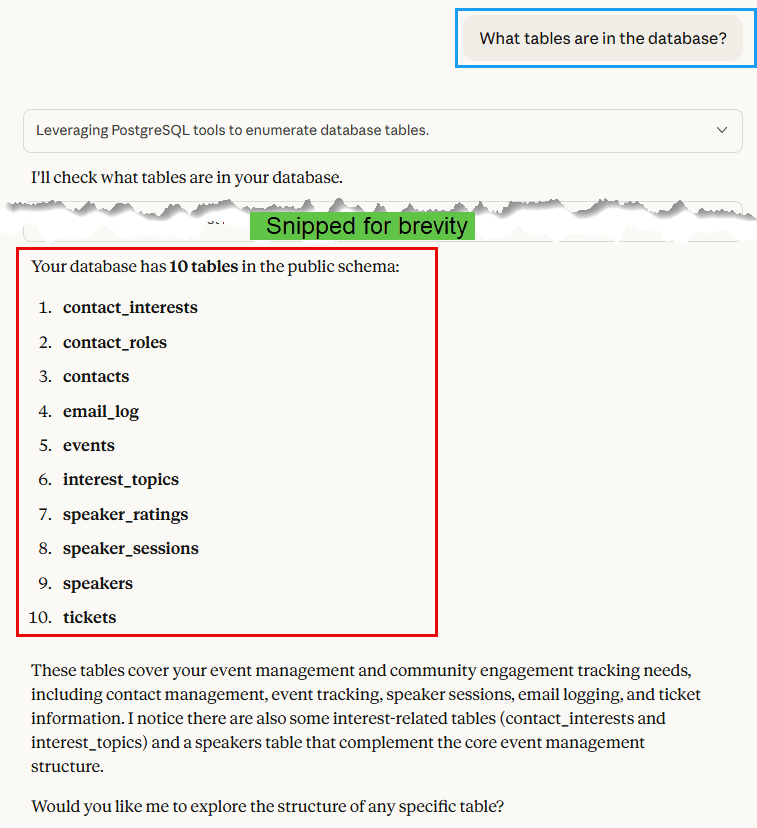
As shown in Figure 1, Claude Desktop confirms that we have 10 tables in the database, up from 7 initially. When I ask about the schema of the tickets table:
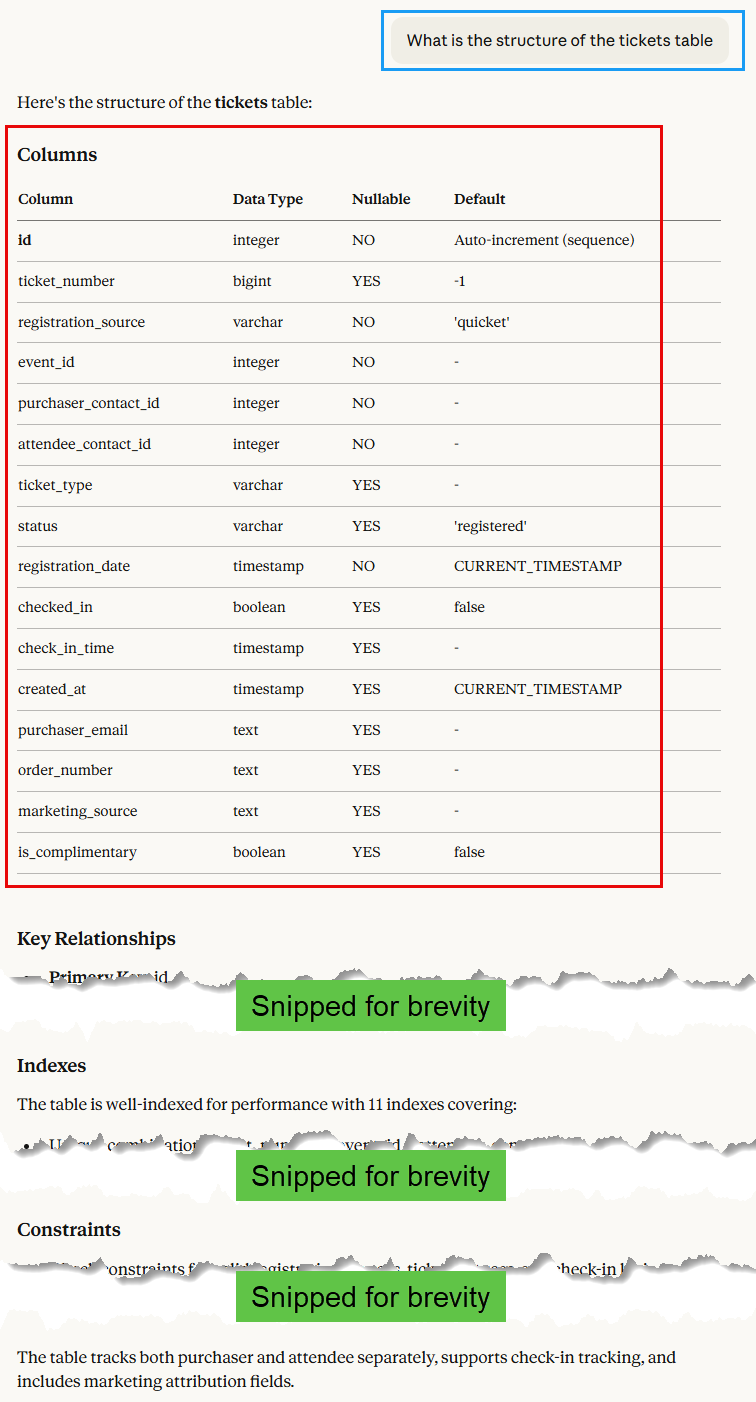
Figure 2 shows that the tickets table now has 15 columns, including the new ones we added based on real data analysis.
Finally, I asked a more complex question to see if the schema changes have impacted analytical queries:
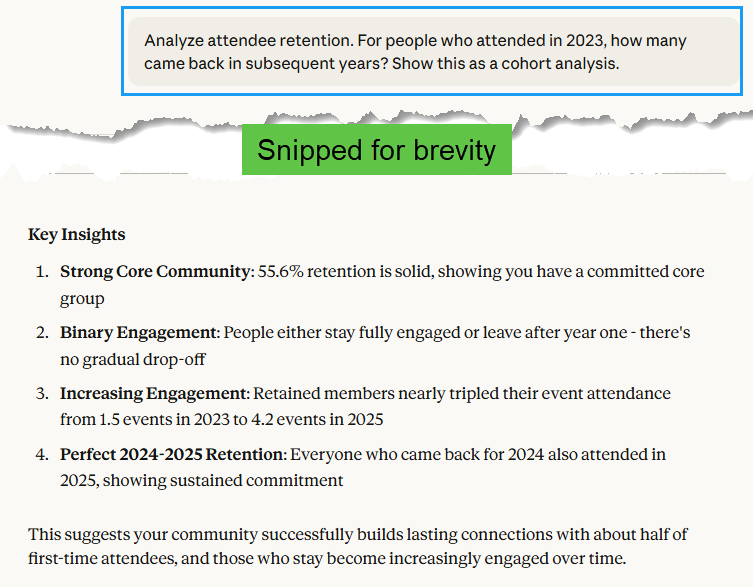
The last query I ran was the same as in Part 5, asking a cohort analysis question. The response is the same as in Part 5. All is good!
NOTE: We do not have any updated data in the database yet. Hence, the queries above were more to see that I hadn’t broken anything with the schema changes. Once we build the import tools in Part 6 and load real data, we will be able to see real insights.
The Lesson: AI-Native Schema Design Methodology
This experience taught me an important lesson about designing with AI assistance.
Traditional Dev Process vs AI-Native Process
Traditional Development Process:
- Think about what you need (mental model)
- Design schema
- Implement
- Discover gaps when building features
- Backfill with workarounds or migrate (painful)
AI-Native Development Process:
- Gather real-world constraints first (CSV files, API responses, actual data)
- Show constraints to AI (upload files, show examples)
- Let AI propose schema (it sees patterns you miss)
- Implement
- Discover gaps are minimal (AI saw edge cases upfront)
The 30-Minute Investment Rule
Spending 30 minutes upfront to:
- Export sample CSV files from your data sources
- Upload them to Claude Code
- Ask “design a schema that handles this data efficiently”
Saves hours of:
- Discovering missing fields later
- Writing migration scripts
- Refactoring import code
- Working around schema limitations
In this case:
- Time spent on migration: 45 minutes
- Time saved in Part 6: Estimated 2-3 hours (no workarounds needed in import code)
Updated Best Practice: Schema Design with Claude Code
For any new project:
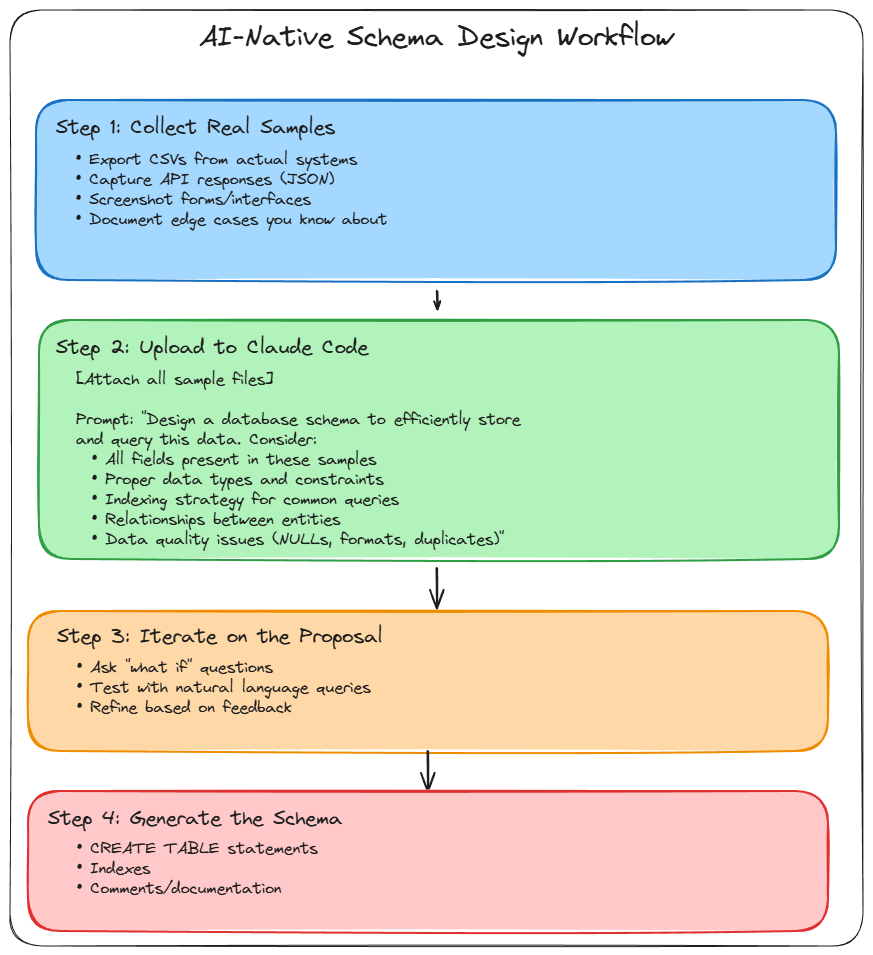
As shown in Figure 4, the best practice is to upload real data examples first, then let Claude Code design the schema based on that data.
This is the AI-native way: show the AI your constraints, let it see the complexity, then design together.
Documenting the Iteration
I wanted to capture this learning moment properly, so I asked Claude Code to update our documentation:
Update CLAUDE.md to document this iteration:

1. Add a "Schema Design Lessons Learned" section
2. Explain the mistake (designing from mental model vs real data)
3. Document the correct approach (upload real data first)
4. Reference this migration as an example of iterative development

Frame this as a positive learning moment, not a failure. AI-native development embraces iteration.
Code Snippet 16: Update CLAUDE.md with Learning
Claude Code updated CLAUDE.md with a new section that will help future developers (including future me) remember this lesson.
It also created a note in docs/decisions/002-schema-refinement.md documenting:
- Why we made these changes
- What analysis led to the decision
- Impact on existing code
- Migration applied
This creates an audit trail of architectural decisions.
Bridge to Part 6: Ready for Clean Import Implementation
With our schema refined, we’re now ready to build the import MCP server in Part 6.
The difference:
Without this refinement:
- Import code would need workarounds for missing fields
- Either lose data (skip order_number, track, etc.)
- Or create hacky solutions (JSON columns, separate tables)
- More complex code to maintain
With this refinement:
- Import code is straightforward (map CSV columns to database columns)
- No data loss (every important field has a home)
- Clean, maintainable implementation
- Import logic focuses on business rules, not schema workarounds
In Part 6, we will build a FastMCP server that ingests the CSV files directly into our refined schema, leveraging all the new fields for richer data capture and analysis.
The import code will be clean, understandable, and maintainable because the schema was designed with real data in mind.
Summary: Embracing Iteration in AI-Native Development
What we accomplished in Part 5.5:
- ✅ Analysed real CSV exports from Quicket, Sessionize, and Microsoft Forms
- ✅ Identified missing fields and tables in our original schema
- ✅ Generated a backwards-compatible migration
- ✅ Applied the migration to our Neon database
- ✅ Verified natural language queries still work
- ✅ Enhanced test data to demonstrate new capabilities
- ✅ Documented the learning for future reference
Time invested: ~45 minutes
Time saved in Part 6: Estimated 2-3 hours (no schema workarounds)
Lesson learned: Start with real data samples when designing with AI
This wasn’t a mistake, it was an iteration. AI-native development embraces this:
- Build → Learn → Refine → Repeat
- Real-world constraints reveal themselves gradually
- AI helps you iterate quickly (45-minute migration vs. hours of manual work)
- Document the iterations (they’re valuable learning)
Traditional software development aims to get everything right upfront (the waterfall model). Agile development embraces iteration within sprints. AI-native development accelerates iteration to hours instead of weeks.
This is how development should feel:
- Discover a gap
- Have a 10-minute conversation with Claude Code about it
- Generate a solution
- Apply it
- Move forward
Not:
- Discover a gap
- Schedule a meeting
- Debate solutions for days
- Write migration manually
- Test extensively
- Finally apply it a week later
Series Progress:
- ✅ Part 1: Installation & Setup
- ✅ Part 2: IDE Integration
- ✅ Part 3: Architecture Planning
- ✅ Part 4: Database Infrastructure
- ✅ Part 5: Schema Design & Natural Language Queries
- ✅ Part 5.5: Schema Refinement (this post)
- 🚀 Part 6: Custom Import MCP Server (next)
With a solid, well-designed schema in place, we’re ready to build the import infrastructure in Part 6.
~ Finally
This unplanned post documents an important aspect of AI-native development: iteration is fast, and embracing it makes you more productive.
Traditional development punishes iteration (it’s expensive and time-consuming). AI-native development rewards iteration (quick, conversational, well-documented).
The mindset shift:
- Old: “Get the schema perfect upfront or pay the price later”
- New: “Start with the best information available, iterate when you learn more”
Key takeaway for your own projects:
When designing anything with Claude Code:
- Show it your real-world constraints first (files, APIs, examples)
- Let it see the complexity
- Design together
- Iterate as you learn
See you in Part 6, where we’ll build the import MCP server. It will be clean and straightforward because our schema is right.
Questions or thoughts?
- Ping me: niels.it.berglund@gmail.com
- Follow on LinkedIn: linkedin.com/in/nielsberglund
Found this helpful? Share it with your network! Sometimes the unplanned posts are the most valuable.
comments powered by Disqus